
Appearance
Leaderboard
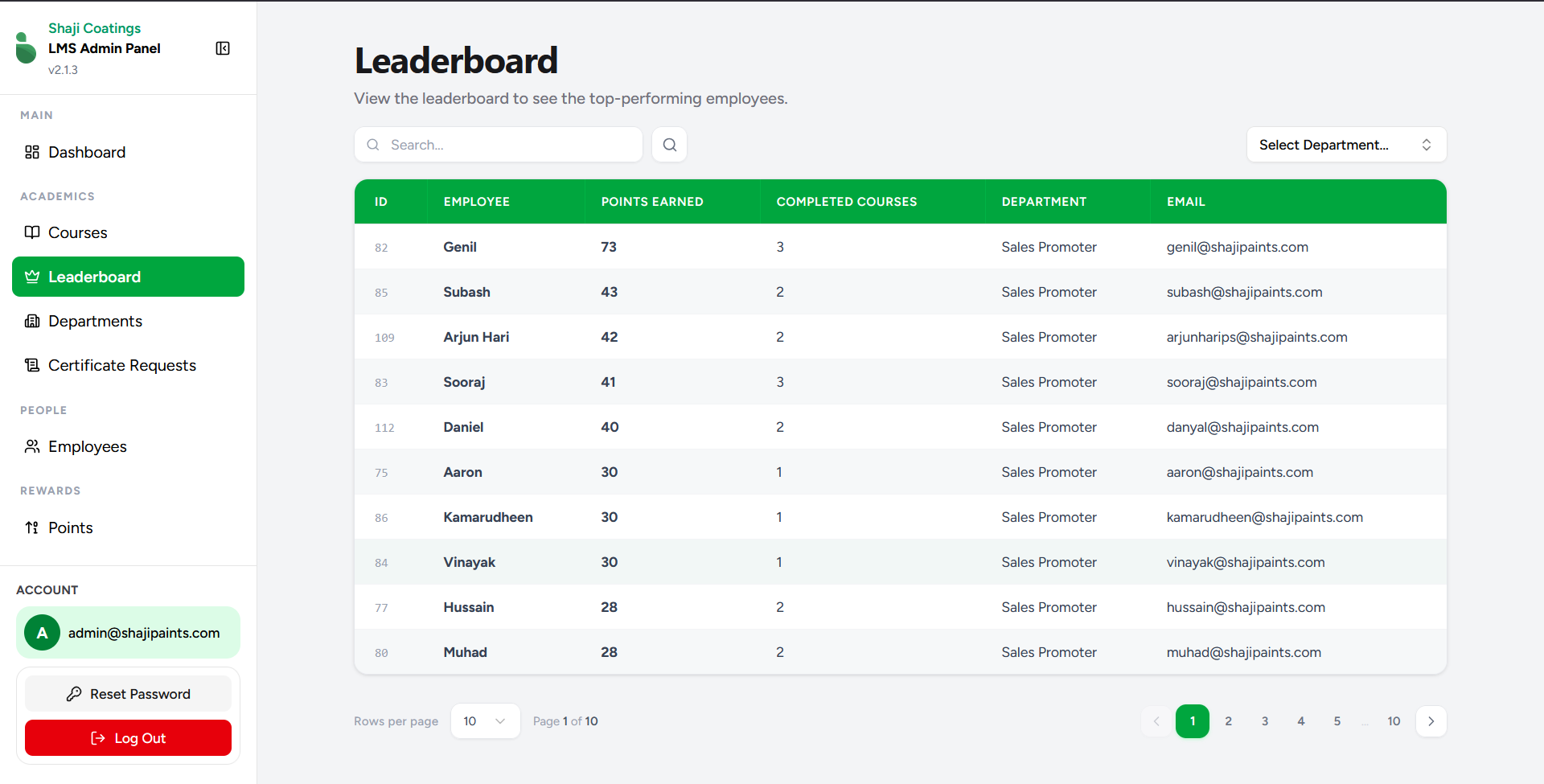
The Leaderboard screen allows administrators to track and view the top-performing employees across the organization based on their accumulated reward points.
Overview
This screen provides a comprehensive ranking of employees, helping administrators easily identify high achievers within the learning management system. By default, it displays the highest scores among all departments, but it can be easily refined to show department-specific rankings.
Key Features
- Search Functionality: A dedicated search bar allows administrators to quickly look up specific employees by name, email, or other identifying details.
- Department Filter: The "Select Department..." dropdown enables filtering the leaderboard to display top performers exclusively within a chosen department.
- Data Overview: The central leaderboard table displays the following detailed metrics:
- ID: The system's unique identifier for the employee record.
- EMPLOYEE: The name of the employee.
- POINTS EARNED: The total number of reward points the employee has accumulated (the primary metric for ranking).
- COMPLETED COURSES: The total count of courses the employee has successfully finished.
- DEPARTMENT: The designated department the employee belongs to.
- EMAIL: The employee's contact email address.
- Pagination Controls: Located at the bottom of the screen, these controls allow administrators to navigate through multiple pages of rankings and adjust the number of rows displayed per page for easier viewing.